A Quick Look at What Ventoy Is
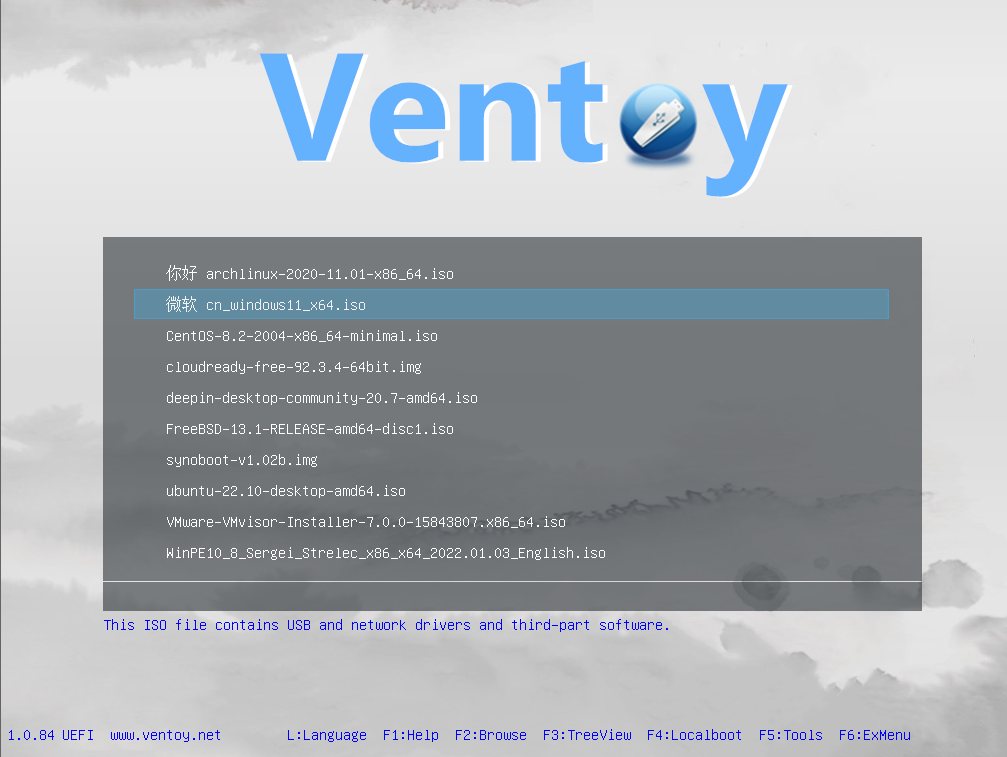
Download ventoy v1.0.87 which was released on January 7, 2023, bringing a combination of usability enhancements, new hardware support, checksum improvements, and a set of targeted bug fixes. Before diving into the specifics of version 1.0.87, it helps to understand what makes Ventoy such a beloved tool in the Linux and sysadmin communities. Ventoy is a free, open-source utility for creating bootable USB drives. Unlike traditional tools that require you to reformat a USB drive every time you want to flash a new operating system image, Ventoy takes a completely different approach. You install it onto a USB drive once, and from that moment forward, all you have to do is copy your ISO, WIM, IMG, VHD(x), or EFI files directly onto the drive. Ventoy detects them automatically and presents a clean boot menu when you start your computer from that drive.
Ventoy was first released on 5 April 2020 by developer Hailong Sun, also known as longpanda, and is licensed under GPLv3+. Since that initial release, the project has grown into one of the most comprehensive multiboot solutions available, supporting an enormous range of hardware configurations and operating systems. Version 1.0.87 continues that tradition of steady, meaningful improvement with a focused set of new features, expanded hardware support, and a series of important bug fixes.
Release Overview: What Is New in v1.0.87
Ventoy v1.0.87 was released on January 7, 2023, bringing a combination of usability enhancements, new hardware support, checksum improvements, and a set of targeted bug fixes. While not the largest release in Ventoy’s history, it addresses several pain points that users had been raising in the community and introduces refinements that make day-to-day use noticeably smoother. The changes span the boot menu interface, file verification systems, plugin configuration, and compatibility with specific vendor hardware.
New Feature: Return to Previous Menu in the Secondary Boot Menu
One of the most immediately useful additions in this release is a quality-of-life improvement to how users navigate the boot menu. Version 1.0.87 adds a “Return to previous menu” option within the secondary boot menu, making it easy to navigate back without having to restart the entire boot sequence.
Before this change, users who had navigated into a secondary menu — such as when selecting a boot mode, a persistence option, or a WIM image variant — had no clean way to go back without rebooting the machine or proceeding with a selection they no longer wanted. This was a minor but genuine annoyance, particularly in scenarios where users were exploring multiple boot options or had accidentally entered the wrong submenu. The addition of a proper back navigation option makes the Ventoy boot menu feel considerably more polished and professional, especially for users who are presenting these menus to others in IT or educational settings.
Theme Plugin Enhancement: Maximum Screen Resolution Control
Another notable improvement in v1.0.87 targets the visual presentation of the boot menu itself. By adding the “max” attribute to the gfxmode setting in the /ventoy/ventoy.json configuration file, users can now raise the maximum screen resolution of the boot menu above the previous ceiling of 1024×768, enabling a much better visual experience on modern displays.
This change matters more than it might initially seem. Ventoy supports a rich theming system based on the GRUB2 framework, and many community-created themes are designed with higher resolutions in mind. On modern monitors and laptop screens, being capped at 1024×768 made the boot menu look blurry or poorly scaled. With the new max value option in the theme plugin, users can now configure their Ventoy setup to render the boot interface at resolutions appropriate for contemporary hardware, making themed Ventoy installations look significantly cleaner and more refined.
Expanded Checksum Support: BSD Style and VENTOY_CHECKSUM File
Security-conscious users who verify the integrity of their image files before booting them received two meaningful improvements in this release.
BSD-Style Checksum Format Support
Version 1.0.87 adds support for BSD-style formatting in .md5, .sha1, .sha256, and .sha512 checksum files. Prior to this release, Ventoy only recognised GNU-style checksum files, which format the hash and filename in a specific layout. BSD-style checksum files use a different structure, presenting the algorithm name, filename, and hash value in a distinct arrangement. Many tools and platforms generate checksums in BSD format by default, meaning users were previously forced to convert their checksum files manually or create new ones in GNU format just to use Ventoy’s verification feature. Support for both formats removes this friction entirely and makes the checksum verification workflow compatible with a much wider range of sources.
VENTOY_CHECKSUM File Support
The release also introduces support for a dedicated VENTOY_CHECKSUM file, which allows users to consolidate checksum values for multiple image files in a single unified file that Ventoy can match against. This is particularly convenient for users who maintain a large library of ISO files on their Ventoy drive. Instead of having individual checksum files scattered alongside each image, everything can be centralised in one place, making management and verification much cleaner and more organised.
Expanded Hardware Compatibility: Lenovo and Dell
One area where Ventoy consistently improves with each release is compatibility with proprietary and vendor-specific ISO formats. Version 1.0.87 is no exception.
Lenovo Product Recovery ISO Support
This release adds explicit support for Lenovo Product Recovery ISO files. These are manufacturer-provided recovery images that Lenovo distributes for restoring ThinkPad, IdeaPad, and other Lenovo devices to factory condition. Previously, users attempting to boot these images through Ventoy would encounter errors or failed boot attempts because the images use a non-standard structure that Ventoy did not recognise. With native support added in v1.0.87, IT teams and individual users who manage Lenovo hardware can now include these recovery images directly in their Ventoy drive alongside other OS images.
Dell PER ISO Support
Support for Dell PER ISO files was also added in this release. Dell PER refers to Dell’s PowerEdge RAID configuration and recovery tools, packaged as bootable ISO images used in server management and deployment workflows. Server administrators managing Dell infrastructure can now boot these images directly from a Ventoy drive without needing a separate dedicated USB stick for Dell-specific tooling. This is a small but meaningful improvement for data centre and enterprise environments.
Porteus ISO Support in GRUB2 Mode
Version 1.0.87 extends GRUB2 mode compatibility to include Porteus ISO files. Porteus is a highly portable, modular Linux distribution designed to run entirely from a USB drive or other removable media. It has a dedicated user base that values its small footprint and the ability to customise it with downloadable modules. Previously, Porteus required specific boot configuration that Ventoy’s standard boot mode did not handle correctly. By adding GRUB2 mode support for Porteus, users can now include it in their Ventoy drive and boot it reliably using the GRUB2 handoff option in the Ventoy menu.
Bug Fixes: Key Issues Resolved
Alongside the new features, v1.0.87 delivers a set of targeted bug fixes that resolve genuine usability problems.
VHD and VHDX Boot Fix in Extended Logical Partitions
A bug was fixed that prevented VHD and VHDX files from booting correctly when accessed through the F2 browse mode if those files were located on an extended logical partition. Extended logical partitions are a common arrangement on older hard drives using the MBR partitioning scheme, and many users who store virtual disk images on secondary drives use this configuration. The fix ensures that F2 browse mode reliably boots VHD and VHDX files regardless of the partition layout of the host drive.
F5 Tools Menu Title Fix
A display issue with the menu title in the F5 Tools section, specifically in the Power submenu entry labelled $VTLANG_POWER_REBOOT_EFIFW, was corrected in this release. This was a cosmetic issue where the raw language variable string was appearing as the menu label instead of the localised human-readable title, making the menu look unfinished or broken on certain configurations.
Disabled Fn Hotkeys in Specific Menus
Fn hotkeys are now disabled in the autoinstall, persistence, and WIM select menus. These hotkeys, which allow users to perform actions like browsing files or accessing tools, were triggering unintended behaviour when users were navigating these more focused selection menus. Disabling them in those specific contexts prevents accidental actions and makes the experience more predictable.
Language Menu Blank Item Fix
A blank item that was appearing at the bottom of the Language selection menu has been removed. While purely cosmetic, this kind of visual artefact erodes confidence in the interface and confused users who were unsure whether the blank entry represented a valid option or a rendering error.
Persistence Menu Display Fix
A menu display issue that occurred when using the VTLANG_NO_PERSISTENCE language variable was also corrected. This affected users who had configured Ventoy to suppress persistence options for certain images, where the menu was rendering incorrectly under specific language settings.
Checksum File Path Fix in F2 Browse Mode
The file path resolution for checksum files was corrected when operating in F2 browse mode. Previously, Ventoy was failing to locate the correct checksum file when a user browsed to and selected an image through F2, meaning the verification step was silently failing. The fix ensures checksum verification works correctly regardless of how the image was selected.
Why v1.0.87 Matters for Everyday Ventoy Users
Taken together, the changes in Ventoy v1.0.87 paint a picture of a project that is maturing thoughtfully. The new features are practical and directly address real frustrations reported by the community. The navigation improvement in the secondary boot menu, the resolution control for themes, and the expanded checksum options all make Ventoy more pleasant to use on a daily basis. The hardware compatibility additions for Lenovo and Dell extend Ventoy’s reach into enterprise and support scenarios where it had previously fallen short.
The bug fixes, while individually small, collectively make the experience more reliable and polished. Each fixed issue represents a situation where something was silently breaking or appearing incorrectly, and resolving these builds the kind of trust that makes a tool feel genuinely dependable rather than just functional.
Ventoy v1.0.87 is a well-rounded release that demonstrates the project’s ongoing commitment to both user experience and broad compatibility. Whether you are a home user maintaining a personal rescue toolkit, an IT professional managing deployments across different hardware brands, or a power user who cares deeply about image integrity and verification, this release brings something meaningful to the table. The combination of polished interface improvements, expanded vendor support, stronger checksum flexibility, and a reliable set of bug fixes makes v1.0.87 a confident step forward in Ventoy’s evolution as the definitive multiboot USB solution.