Ventoy reached its stable release of version 1.1.12 on April 23, 2026, and while the changelog is compact compared to some of the tool’s more feature-heavy past releases, what it delivers is precisely targeted at the real-world pain points that users and system administrators have been encountering in daily use. This release does not chase new capabilities for the sake of version padding. Instead, it zeroes in on a handful of critical compatibility and display issues that have been causing genuine disruption for people working with modern Linux distributions, legacy enterprise systems, and virtualised environments.
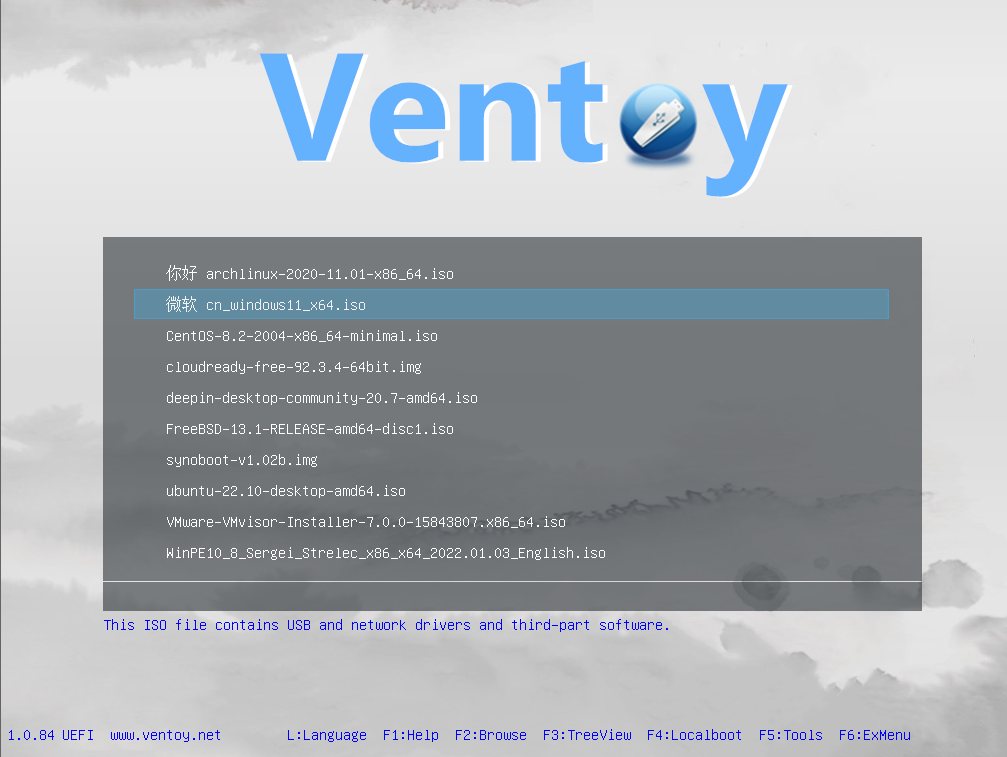
For anyone unfamiliar with the tool, Ventoy is a free and open-source utility that allows users to load multiple bootable ISO, WIM, IMG, VHD(x), and EFI image files onto a single USB drive without reformatting it between uses. A boot menu presents all loaded images at startup, and the user simply selects whichever one they need. Version 1.1.12 continues this tradition while shoring up specific rough edges that have emerged as hardware and OS ecosystems evolve.
The Core Fixes in v1.1.12
Ubuntu 24.04.4 Installation Failure Resolved
One of the most immediately impactful changes in this release is the resolution of a persistent installation failure affecting Ubuntu 24.04.4. Ubuntu 24.04.4 had a stubborn installation failure that left users staring at blank screens or dropped installers mid-flight. That specific bug gets patched here, which means fresh installs on newer Debian derivatives will actually finish without requiring workarounds.
This was not a minor inconvenience. Ubuntu 24.04.4 is a long-term support release, meaning it is one of the most widely deployed Ubuntu versions in both home and enterprise settings. Anyone relying on Ventoy to deploy or reinstall this OS version would have been completely blocked, forced either to use an alternative flashing tool or to hunt for unofficial workarounds. The fix removes that friction entirely and restores Ventoy’s expected reliability for this critical distribution.
VirtualBox UEFI Display Issue Fixed
The second significant fix in v1.1.12 addresses a display problem that was affecting users booting Windows inside VirtualBox through Ventoy. VirtualBox users who noticed a garbled UEFI display when launching Windows virtual machines get a proper fix, along with broader improvements to resolution handling for Windows and WinPE environments.
This particular issue was especially problematic for developers and testers who use VirtualBox as part of their workflow. When testing Windows environments, a corrupted or incorrectly rendered UEFI display can make it impossible to navigate installation menus, enter firmware settings, or even confirm that a boot is progressing correctly. The fix brings VirtualBox-based Windows booting back to the same standard of reliability that Ventoy delivers on physical hardware.
Beyond the VirtualBox-specific patch, broader improvements were made for UEFI boot Windows and WinPE resolution issues, meaning the benefits extend to a wider range of scenarios where Windows or Windows Preinstallation Environments are being booted through UEFI firmware. This is particularly relevant for IT professionals using WinPE-based diagnostic and recovery tools, where display reliability is essential for usability.
Oracle Linux 6.9 Compatibility Restored
The third core fix in this release addresses a compatibility problem with Oracle Linux 6.9. Oracle Linux 6.9 also clears up an old compatibility snag that kept some legacy enterprise setups from booting properly through the USB drive.
Oracle Linux 6.9 is an older enterprise release, but it remains in active use in many corporate and data centre environments where long-term stability and consistent software stacks are prioritised over frequent OS upgrades. The fact that this fix was included reflects Ventoy’s commitment to supporting not just the latest and most popular distributions but also the legacy systems that real-world enterprise environments depend upon. For system administrators tasked with maintaining older Oracle Linux infrastructure, this patch is genuinely important.
How the Upgrade Process Works
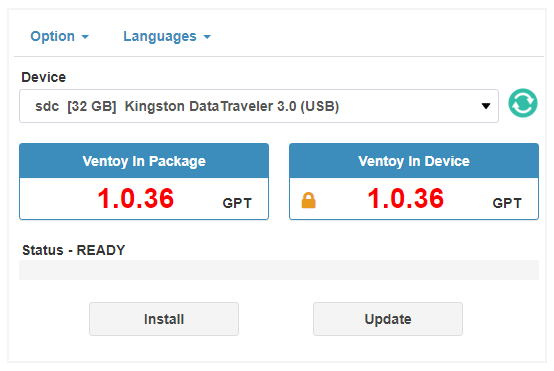
One of the most user-friendly aspects of Ventoy as a tool is that upgrading to a new version is non-destructive, and v1.1.12 is no exception to this principle. The installer detects existing Ventoy partitions and replaces only the core boot files while leaving all the ISO images completely untouched. Users should download the Windows zip file for straightforward extraction, then run the executable as an administrator to trigger the update routine.
For Linux users, the process is equally straightforward. The Linux tarball works just as well for anyone running a terminal-based workflow, though extracting it into an existing Ventoy directory and rerunning the install script does the heavy lifting. Keeping the ISO files intact during the upgrade saves hours of re-downloading gigabyte-sized images from scratch.
This non-destructive upgrade behaviour is one of Ventoy’s most practical differentiators. Users who have accumulated a collection of ISO files on their Ventoy drive, potentially dozens of gigabytes worth of operating system images, do not need to back them up, remove them, or re-download them after updating. The upgrade is surgical, touching only what needs to change.
SHA-256 Verification and Download Integrity
Grabbing the official zip or tarball requires a quick SHA-256 verification step before flashing, but the update keeps the tool lean while fixing exactly what breaks in real-world lab environments. The official checksums published alongside the release allow users to confirm that their downloaded files have not been tampered with or corrupted during transmission. This is an important security step, particularly given that bootable USB tools have deep access to system firmware and storage during their operation.
For v1.1.12, three packages are available: the Windows zip package, the Linux tar.gz package, and a LiveCD ISO for users who want to run the Ventoy installer from a bootable environment itself. Each has its own published SHA-256 hash for verification.
Continuing Platform and Architecture Support
While v1.1.12 is primarily a bug-fix release, it continues to carry the full breadth of platform support that Ventoy has built up across its development history. The tool supports x86 Legacy BIOS, IA32 UEFI, x86_64 UEFI, and ARM64 UEFI modes, and covers over 110 common types of operating systems including Windows, WinPE, Linux, and VMware. This means a single v1.1.12 Ventoy drive is capable of booting on a wide spectrum of hardware, from decade-old laptops relying on Legacy BIOS to modern ARM-based systems with UEFI firmware.
This universality is one of the foundational design goals of the project, and every release, including this one, is built to maintain that compatibility across the full range of supported architectures without requiring users to maintain different USB drives for different hardware types.
iVentoy: The Companion Project Making Noise
Accompanying the v1.1.12 release is continued development attention on iVentoy, a related but distinct project. A quiet side release called iVentoy also arrives to handle network-based PXE deployments across x86 and ARM systems without forcing admins to wrestle with traditional DHCP or TFTP setups.
iVentoy is positioned as an enhanced PXE server that brings the same ease-of-use philosophy that defines Ventoy to the world of network booting. Traditional PXE boot environments require significant configuration work, involving DHCP server modifications, TFTP server setup, and careful management of boot file paths. iVentoy aims to reduce that complexity dramatically, allowing administrators to turn almost any machine into a capable PXE server with minimal setup effort.
iVentoy supports x86 Legacy BIOS, IA32 UEFI, x86_64 UEFI, and ARM64 UEFI modes and can turn any PC, laptop, server, NAS, or Raspberry Pi into a PXE server instantly. This makes it particularly attractive in lab environments, training rooms, or small business settings where network-based OS deployment would be useful but the traditional infrastructure overhead is prohibitive.
What Ventoy v1.1.12 Means for Different Types of Users
For the home user or hobbyist, v1.1.12 is a seamless maintenance update. If Ubuntu 24.04.4 is on your drive or you use VirtualBox for testing, the update directly improves your experience. The upgrade takes minutes and requires no rethinking of your existing setup.
For IT professionals and system administrators, particularly those in enterprise environments running Oracle Linux or deploying Windows images through WinPE, this release restores full functionality in areas where previous versions had introduced friction. The Oracle Linux 6.9 fix in particular is a reminder that Ventoy takes legacy enterprise compatibility seriously, not just the latest consumer distributions.
For developers and testers who run virtualised environments, the VirtualBox UEFI display fix and the broader Windows UEFI resolution improvements make v1.1.12 the most reliable version yet for virtualisation workflows. Testing OS images in VirtualBox using Ventoy becomes a consistently clean experience.
Ventoy v1.1.12 is the kind of release that demonstrates mature software development. Rather than loading an update with new features to justify a version bump, the Ventoy development team identified exactly what was breaking in real-world use and fixed it cleanly. Ubuntu 24.04.4 installations now complete without failure. VirtualBox UEFI display rendering now behaves correctly. Oracle Linux 6.9 boots as expected. The upgrade path is non-destructive and takes only minutes.
This release keeps the tool lean while fixing exactly what breaks in real-world lab environments, and that restraint is worth appreciating. For anyone currently running an older version of Ventoy, v1.1.12 is a straightforward and highly recommended update that delivers meaningful improvements without introducing new complexity.