Download FreeFolio – a free, elegant, and fully responsive Freelancer HTML Portfolio Website Template.
The FreeFolio Freelancer HTML Website Template is a sleek, professional, and mobile-responsive template designed for freelancers, developers, designers, and creatives who want to build a compelling personal portfolio online. Built with the latest Bootstrap 5 framework, FreeFolio offers a seamless user experience, clean layout, and flexible customization that makes it ideal for personal branding and professional promotion. Whether you’re a web designer, front-end developer, content creator, or digital marketer, this free HTML template provides everything you need to present your skills, services, and projects in an engaging and visually appealing way.

FreeFolio is developed using modern technologies including HTML5, CSS3, Font Awesome, and Owl Carousel, ensuring that your website looks sharp and functions smoothly across all devices and browsers. With its integrated sections like About Me, Skills, Services, Portfolio, Testimonials, Blog, and Contact, this template allows freelancers to create a full-fledged personal website without writing complex code from scratch.
Why You Need a Freelancer Portfolio Website
In the digital era, personal branding is essential. Clients and employers often assess professionals through their online presence before initiating contact. Having a personal portfolio website helps you:
- Establish credibility and showcase your skills visually.
- Present your work samples and previous projects attractively.
- Share client testimonials and professional achievements.
- Allow potential clients to reach you easily through integrated contact forms.
- Improve your online visibility through SEO-friendly content structure.
The FreeFolio HTML template makes this process effortless. It’s designed with modern aesthetics, fluid responsiveness, and performance optimization, giving freelancers a competitive edge online.
Key Features of the FreeFolio HTML Template
1. Responsive and Mobile-Friendly Design
FreeFolio’s design adapts perfectly to all devices — desktop, tablet, and smartphone. The flexible Bootstrap grid system ensures that your website maintains its layout integrity regardless of screen size, offering a smooth browsing experience for every user.
2. Elegant Navbar and Smooth Navigation
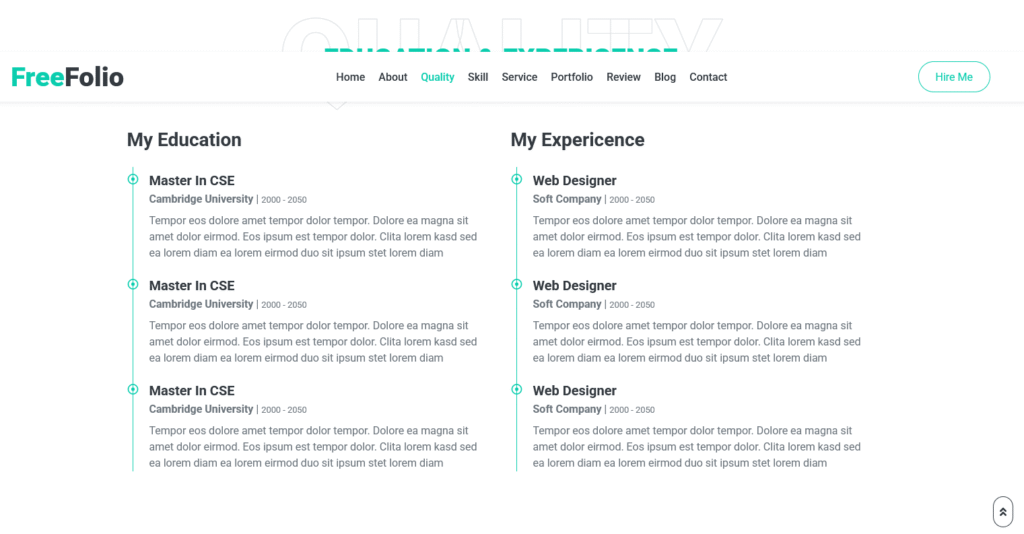
The fixed-top navigation bar provides intuitive access to key sections such as Home, About, Skills, Services, Portfolio, Testimonials, Blog, and Contact. The “Hire Me” button is prominently displayed, encouraging visitors to connect instantly. The scroll-spy integration highlights active links while navigating, improving user interaction.
3. Eye-Catching Hero Section
The hero area introduces your professional persona with style. It includes a circular profile image, animated typed text for displaying roles like Web Designer, Developer, or App Creator, and clear calls-to-action such as Download CV and Play Video. This section creates an immediate impression and helps visitors understand your expertise in seconds.
4. About Me Section

The About section provides an opportunity to showcase your background, experience, and personal information. It features an image on one side and descriptive text with details like name, degree, experience, contact information, and freelance availability on the other. Buttons like Hire Me and Learn More enhance engagement and lead conversion.
5. Education and Experience Timeline
FreeFolio includes a beautifully structured Education and Experience timeline. Each milestone is marked with icons and connected lines for visual clarity. You can list your degrees, institutions, previous job titles, and brief descriptions. This design makes your professional journey easy to follow and visually appealing.
6. Skill Progress Bars
The Skills section displays your technical competencies using interactive progress bars. It allows you to present your expertise in HTML, CSS, PHP, JavaScript, AngularJS, and WordPress with animated percentages. This visual representation adds credibility and gives potential clients a quick overview of your capabilities.
7. Services Section for Freelancers
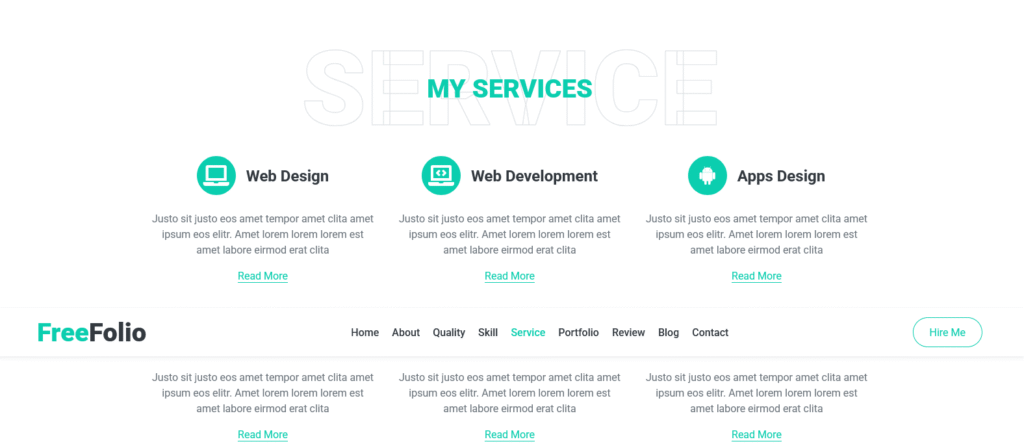
One of the highlights of the FreeFolio template is its My Services section. Each service is represented with an icon, title, description, and a “Read More” link. You can feature your offerings such as:
- Web Design – Custom website layouts and creative UI design.
- Web Development – Building functional, dynamic, and secure web applications.
- App Design & Development – Designing and coding mobile-friendly apps.
- SEO Services – Optimizing websites for better search engine visibility.
- Content Creation – Writing engaging and effective web copy.
This section ensures visitors clearly understand what you can do for them and motivates them to hire you.
8. Portfolio Gallery
The Portfolio section is where your work shines. It’s designed using an image grid layout with category filters such as Design, Development, and Marketing. Each portfolio item opens in a lightbox view when clicked, allowing visitors to see your work in larger detail. You can easily add images and categorize your projects for better organization.
9. Testimonial Carousel
Client feedback plays a crucial role in building credibility. The Testimonial section uses Owl Carousel to display client reviews dynamically. Each testimonial card includes the client’s photo, quote, and profession. The rotating layout keeps your website engaging while highlighting your reliability and success stories.
10. Blog Integration
The blog area provides space to share industry insights, tutorials, or personal experiences. Regularly updating your blog enhances SEO, keeps visitors informed, and showcases your thought leadership. FreeFolio’s layout supports featured images, post previews, and call-to-action buttons like “Read More.”
11. Contact Section with Form
The Contact Me section at the bottom includes your address, phone, and email, along with a functional contact form. Visitors can send direct inquiries without leaving the page, improving communication flow. This section is crucial for converting interested visitors into actual clients.
Technical Composition and Design Framework
Built on Bootstrap 5
Bootstrap ensures responsive layouts and consistent UI elements across browsers. The use of Bootstrap classes and utility components simplifies editing, making the template beginner-friendly for developers or freelancers with limited coding experience.
Font Awesome and Bootstrap Icons
FreeFolio integrates Font Awesome 5 for scalable vector icons. Whether for services, skills, or contact info, the icons enhance visual appeal and aid navigation.
Owl Carousel and Lightbox
Interactive plugins like Owl Carousel (for testimonials and portfolios) and Lightbox (for viewing enlarged images) add animation and fluidity to your design, ensuring an engaging user experience.
Custom CSS and Style Enhancements
The included style.css file is well-commented, allowing easy customization of colors, typography, and spacing. The primary color theme is clean, professional, and easy on the eyes, aligning perfectly with creative personal branding.
SEO-Optimized Structure
FreeFolio follows SEO best practices through:
- Proper HTML5 semantic tags (header, section, footer).
- Fast-loading lightweight structure.
- Mobile-friendly responsiveness (improving Google ranking).
- Optimized headings and meta tags for keywords like Freelancer Portfolio, Web Developer Template, and Free HTML Template.
These practices help your portfolio site gain better visibility on search engines, attracting more clients and job opportunities.
Advantages of Using FreeFolio Template

Quick Setup and Easy Customization
FreeFolio requires minimal setup. You can download, unzip, and upload it to your hosting service. The code is clean, modular, and easy to modify. Changing text, adding images, or customizing colors takes only a few minutes.
Professional Branding Made Simple
This template enables freelancers to establish strong branding through consistent design, typography, and visual elements. You can easily replace the logo, profile image, and name to personalize your portfolio.
Lightweight and Fast Loading
Built with minimal dependencies, FreeFolio loads quickly on all devices. Fast loading enhances user experience, decreases bounce rate, and boosts your site’s SEO performance.
Cross-Browser Compatibility
The template works flawlessly across Chrome, Firefox, Safari, Edge, and Opera, ensuring universal accessibility and consistent display.
Free and Open Source
FreeFolio is completely free for personal and commercial use. It’s ideal for freelancers and startups looking for a professional online presence without spending money on web design.
How to Get Started with FreeFolio Freelancer Template
Step 1: Download and Extract Files
Download the FreeFolio HTML package and extract the files to your local system.
Step 2: Customize the Content
Use any text editor like VS Code, Sublime Text, or Notepad++ to modify the text, headings, and image paths. Update your personal details, skills, and portfolio images.
Step 3: Add Your Media and Links
Replace placeholder images with your actual project screenshots, and update social media and contact links.
Step 4: Configure Forms and Video Modal
If you want your contact form to send messages, connect it with a backend script (PHP or Formspree). The embedded YouTube video modal in the hero section can be replaced with your own introduction or showreel.
Step 5: Upload and Launch
Upload all files to your hosting server using FTP or your hosting control panel. Once uploaded, test your site on various devices and browsers to ensure smooth operation.
Tips for Maximizing Your Freelancer Portfolio Website
Optimize for SEO and Performance
Use descriptive meta titles and keywords like “Freelance Web Developer” or “Portfolio HTML Template.” Compress images to improve load times and use proper alt text for better indexing.
Highlight Achievements and Client Logos
Showcase certifications, awards, or logos of clients you’ve worked with. This builds trust and social proof.
Integrate Google Analytics
Tracking visitor behavior helps you understand audience preferences and optimize your content strategy for better engagement.
Add Testimonials and Case Studies
Authentic testimonials and short case studies demonstrate your credibility. They give prospective clients confidence in your skills.
Keep the Blog Updated
Regularly post relevant content such as design trends, project experiences, or tech tutorials. It not only strengthens SEO but also establishes your authority.
Include a Downloadable CV
Having a downloadable resume makes it easier for potential employers or clients to save your details for future reference.
Why FreeFolio Stands Out Among Other Free Templates
Many free templates lack structure or customization flexibility, but FreeFolio is specifically tailored for freelancers and creatives. Its sections are intuitively designed for personal portfolios, with strong calls-to-action and attractive animations. The combination of clean code, responsive layout, and beautiful design makes FreeFolio one of the most professional free templates available. It balances aesthetics and performance — two qualities crucial for freelancers who need a fast, visually appealing site to impress clients.
SEO and Marketing Benefits of Using FreeFolio
FreeFolio’s semantic code helps search engines understand your content hierarchy. By optimizing your page titles, descriptions, and headings, your portfolio can rank higher for searches related to your profession. Integrated blog support also provides an opportunity to target long-tail keywords like freelance web design services or front-end developer portfolio. Moreover, the social media links in the header and footer enhance visibility by connecting your site with external networks like LinkedIn, Behance, or GitHub.
Potential Use Cases for FreeFolio Template
- Freelance Web Designers showcasing creative UI/UX projects.
- Developers highlighting code samples and live project links.
- Photographers or Artists displaying visual portfolios.
- Digital Marketers presenting campaign success stories.
- Consultants or Coaches promoting services and blogs.
Its flexible structure allows users from any creative industry to adapt the layout to their personal brand.
Final Thoughts
The FreeFolio Freelancer HTML Website Template is a versatile, high-quality, and fully responsive design solution crafted for modern freelancers. It empowers professionals to build a personal brand, showcase skills, and attract clients with minimal effort. By combining powerful features like animated skill bars, portfolio lightbox, testimonial sliders, and easy navigation, it creates a polished online presence that leaves a lasting impression.
If you’re looking to elevate your freelance career with a free, customizable, and SEO-optimized personal website, FreeFolio is the perfect choice. It embodies simplicity, professionalism, and creativity — all key elements that define a successful freelancer’s digital identity.
Keywords: Free Freelancer HTML Template, FreeFolio Template, Bootstrap Portfolio Theme, Responsive Freelancer Website, HTML Personal Portfolio, Developer Portfolio Template, Web Designer Template, Creative Freelancer Website Design.

Download Freelancer Portfolio HTML Website Template Source Code
You May Also Download Windows Software Here