WordPress 6.9 “Gene” delivers enhanced collaboration, powerful new blocks, AI-ready APIs, performance boosts, and workflow improvements.
Download WordPress Version 6.9.
WordPress 6.9, released December 2, 2025 and codenamed “Gene,” represents one of the most significant updates in the platform’s recent history. This version continues the evolution of WordPress from a content publishing tool to a flexible, collaborative, and extensible platform for creators, developers, and enterprise sites alike. With dozens of feature enhancements across editorial workflows, content design, developer capabilities, APIs, performance improvements, accessibility upgrades, and new blocks, WordPress 6.9 delivers a more powerful and intuitive experience for users at every level. This article dives into all of the major changes in WordPress 6.9, explaining what they are, how they work, and why they matter.
Editorial Collaboration and Workflow Enhancements
One of the most visible and impactful updates in WordPress 6.9 is the introduction of block-level collaboration tools designed to streamline content review and team workflows without leaving the editor.
Notes: Built-in Block Comments
WordPress 6.9 introduces Notes, a collaboration feature that lets users leave comments directly on individual blocks within the editor. Rather than relying on external communication tools, team members can place feedback right where it’s relevant—on text blocks, design elements, or any other content component. Notes support threaded conversations, can be resolved when addressed, and generate email notifications to keep the author or editor informed. This significantly reduces friction in editorial review cycles and makes internal communication more contextual.
Expanded Command Palette Across the Dashboard
Another productivity enhancement is the Command Palette’s presence throughout the entire WordPress admin interface. Previously limited to certain parts of the Site Editor, the Command Palette in 6.9 can be accessed from any dashboard screen by pressing Ctrl/Cmd + K. This provides instant access to navigation, quick actions, and search across posts, pages, templates, settings, plugins, and more. Power users and administrators can now bypass nested menus and maximize efficiency. Developers can even register custom commands to support specific workflows.
Design and Content Creation Enhancements
WordPress 6.9 also delivers improvements to content design and authoring tools that benefit creators, marketers, and anyone building visual web experiences.
Fit Text to Container
Typography control receives a boost with the Fit Text option added to Paragraph and Heading blocks. This setting automatically adjusts the font size to fill its container, enabling designers to create dynamic headlines and banners that adapt to their allotted layout space without writing custom CSS. It streamlines responsive typography control and makes standout content easier to craft.
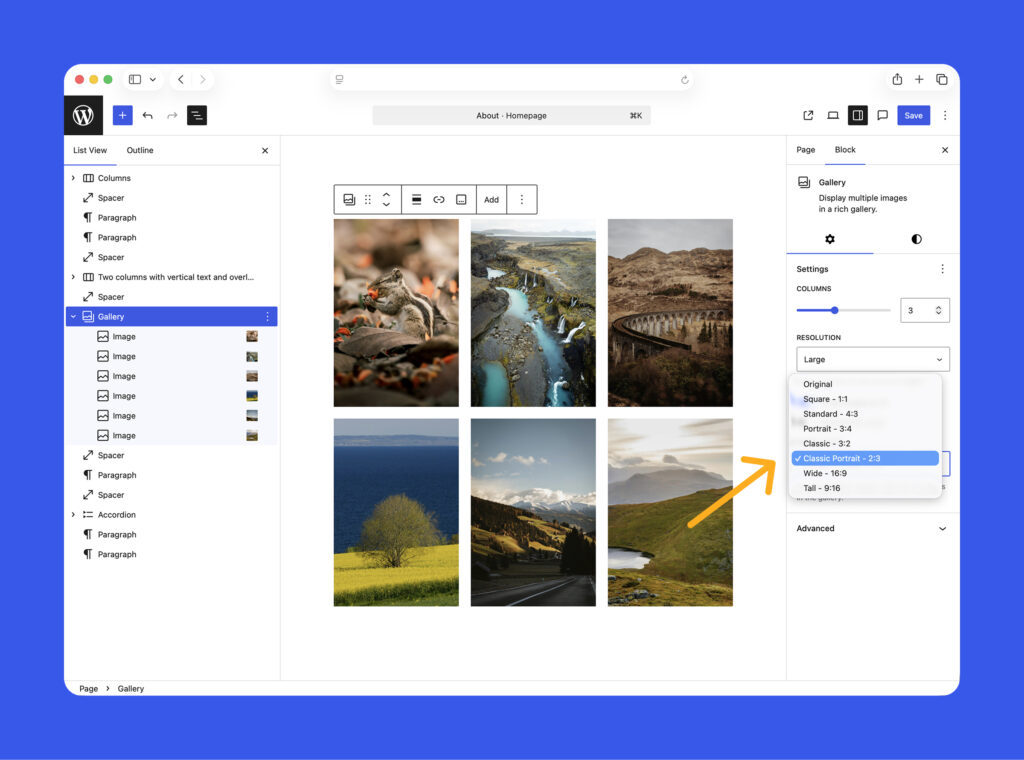
Gallery Block Aspect Ratios and Cover Block Posters
The Gallery block gains a fixed aspect ratio setting, allowing content creators to apply consistent image proportions across galleries with a single click. Meanwhile, Cover blocks with video backgrounds now support poster images—a still image that displays while video content loads on slower connections—enhancing perceived performance and visual continuity.
New and Enhanced Blocks
WordPress 6.9 expands the core block library with several new blocks and upgrades to existing ones:
- Math Block: Designed for technical and educational content, this block supports LaTeX and MathML rendering for clear, accessible display of mathematical equations and notations natively within Gutenberg.
- Accordion Block: Adds collapsible content sections to pages or posts, ideal for FAQs, tutorials, and organized content layouts.
- Time-to-Read Block: Automatically estimates and displays how long it takes to read a given piece of content, helping set reader expectations and improve engagement.
- Comment Count and Comment Link Blocks: These separate the display of comment counts from comment links, giving authors more flexibility in placement and design of comment functionality.WordPress.com
Together, these block upgrades empower publishers to build richer, more dynamic content directly in the block editor without relying on third-party plugins
Flexible Templates and Reusable Layouts
WordPress 6.9 simplifies template management and reuse—an important advancement for multi-site workflows, long-term design consistency, and team collaboration.
Draft and Save Templates Independently
With this update, templates (such as custom theme templates) can now be saved as drafts before they are finalized and published. This gives designers and site builders the ability to iteratively refine layouts without affecting the live site until they are ready. It contributes to better staging workflows and reduces risk of unintended template changes.
Starter Pattern Modal Everywhere
The starter pattern modal, previously confined to specific post types, now appears in all post types that support patterns. This makes it easier to drop pre-designed patterns into posts or pages, accelerating layout creation and reducing repetitive design work—especially on sites with varied content needs.
Developer APIs and Future-Ready Integration
WordPress 6.9 goes beyond visible editor enhancements and provides powerful under-the-hood improvements that prepare the platform for future automation, AI, and dynamic experiences.
The Abilities API: Standardized Machine-Readable Capabilities
One of the most forward-looking changes is the introduction of the Abilities API, a standardized system for registering and exposing WordPress core, plugin, and theme capabilities in a machine-readable format. This API is a foundational piece of what WordPress terms AI Building Blocks, enabling intelligent agents to interact with site functionality more consistently across contexts including PHP, REST, and third-party tools. By pairing the Abilities API with the Model Context Protocol (MCP), WordPress 6.9 lays the groundwork for future AI-assisted workflows, automation, content generation, and deeper integrations without requiring core changes as AI technologies evolve.
Interactivity API Enhancements
Updates to the Interactivity API make client-side navigation and rich interactions smoother and more efficient. These enhancements include the reuse of shared stylesheets, dynamic loading of JavaScript modules, support for nested router regions (enabling advanced UI elements such as modals and overlays), and improved utilities like getServerState and getServerContext that reset appropriately between transitions. TypeScript helper utilities also improve the developer experience when building complex interactive blocks.
Block Bindings API Improvements
WordPress 6.9 expands the Block Bindings API, giving developers more control over dynamic content binding. Developers can now register custom data sources for block attributes and control which attributes are bindable. The editor UI for switching sources is also streamlined, making it simpler for users to connect blocks to external or custom data.
DataViews, DataForm, and Fields API Enhancements
Significant improvements to DataViews and DataForm components make it easier for plugin and theme developers to create robust data-driven interfaces. Enhancements include infinite scroll, locked filtering, layout flexibility (including cards and rows), modal or dropdown panels, and real-time validation. The Fields API now supports 13 field types—such as arrays, telephones, dates, and colors—along with both synchronous and asynchronous validation. These changes reduce boilerplate code for custom admin dashboards and increase consistency across data collection experiences.
Backend, Performance, and Accessibility Enhancements
Beyond editorial and developer workflows, WordPress 6.9 also focuses on performance, stability, and accessibility improvements.
Performance Optimizations
WordPress 6.9 delivers several performance improvements aimed at faster front-end experiences. Enhancements include on-demand loading of block styles for classic themes, minified block theme CSS, and increased limits for inline style handling. Backend performance refinements include optimized database query handling, refined caching mechanisms, improved WP-Cron spawning behavior, and a new template enhancement output buffer that clears rendering bottlenecks. Together, these changes contribute to faster Largest Contentful Paint (LCP) and smoother site behavior for visitors
Accessibility Fixes
In keeping with WordPress’s ongoing commitment to accessibility, version 6.9 includes more than 30 accessibility improvements. These updates improve screen reader announcements, resolve cursor placement issues, ensure typing focus behaves correctly across interactions, and hide unnecessary CSS-generated content from assistive technologies. These refinements make WordPress more accessible to users with disabilities and align with modern usability standards.
Increased Internationalization and UTF-8 Modernization
To improve global compatibility and text handling, WordPress 6.9 introduces enhancements to its UTF-8 support pipeline. This modernization ensures text encoding and processing behave reliably across varied environments and for content that includes international characters, emojis, and special symbols.
Developer-Focused Refinements
WordPress 6.9 continues to refine the developer experience with improvements to core tooling, hooks, and system APIs:
- Streaming Block Parser: A new tool (
WP_Block_Processor) that efficiently scans block HTML and helps convert structures into parsed JSON representations, improving programmatic block analysis. - HTML API Enhancements: Updates and bug fixes to the HTML API improve safety and manipulation for external code interacting with HTML structures.
- Removal of Legacy IE Conditional Asset Support: WordPress 6.9 removes legacy support for Internet Explorer conditional scripts and styles, a decision focused on modern browser compatibility.
- Email System Improvements: The
wp_mail()function gains more reliable sender handling and better inline image support in HTML emails, helping developers craft richer transactional and notification templates.Make WordPress
Considerations and Reported Issues
While the update brings many benefits, early adoption on live sites has generated mixed reports in the community regarding compatibility issues with certain themes and plugins. Users have reported isolated problems with specific themes triggering high CPU usage, export tool regressions, or dashboard access issues on certain environments. Administrators preparing to update should ensure backups and staging testing prior to deployment, and monitor plugin compatibility for complex sites. These are typical aspects of any major release cycle and are expected to be addressed in incremental updates
Conclusion
WordPress 6.9 “Gene” is a milestone release that balances editorial productivity, design flexibility, developer extensibility, and performance gains. With features like collaborative block-level Notes, expanded APIs for AI and dynamic experiences, a wider library of core blocks, and backend enhancements, WordPress 6.9 positions the platform for both immediate improvements and future innovation. Whether you are a content creator, site owner, theme designer, or developer, this version delivers meaningful upgrades that elevate the WordPress experience across the board.