Day Care Website HTML Template – A Responsive, Modern and Child-Friendly Web Design for Daycare Centers
The Ultimate “BabyCare” Day Care Website HTML Template for Childcare Centers
The BabyCare Day Care Website HTML Template is a professional, visually delightful, and fully responsive website design tailored specifically for daycare centers, preschools, and childcare service providers. Built with a focus on trust, creativity, and user experience, this template combines beautiful visuals with functional layouts that appeal to parents looking for reliable daycare options. Powered by Bootstrap, Font Awesome, and interactive plugins, BabyCare offers everything you need to showcase your childcare services, teachers, programs, and events in a warm and welcoming online environment.
What Makes the BabyCare Day Care Template Special
The BabyCare HTML template is not just another generic design—it’s crafted with the needs of childcare and preschool businesses in mind. Every section, from the homepage hero banner to the detailed program layouts, is thoughtfully designed to engage visitors and reflect the nurturing nature of early childhood education. With features like animated effects, responsive design, contact forms, and photo galleries, BabyCare empowers daycare centers to build a strong digital presence that inspires confidence in parents.
Key Features of the BabyCare HTML Template
1. Responsive and Mobile-Optimized Layout
BabyCare’s responsive design ensures your website looks beautiful on every screen size, whether it’s a smartphone, tablet, or desktop. Built with Bootstrap 5, the template adapts seamlessly to different resolutions while maintaining high-quality visuals and smooth navigation. Parents can easily explore your services and contact your daycare on the go.
2. Eye-Catching Hero Section
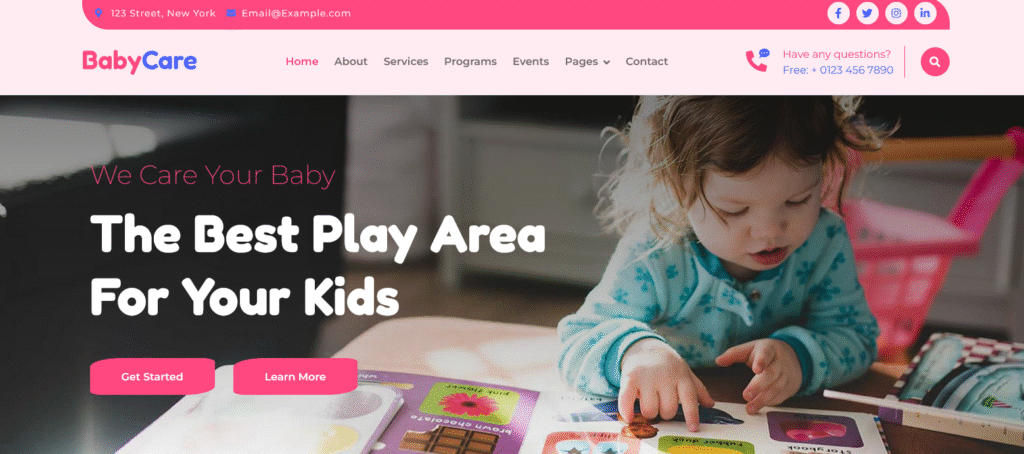
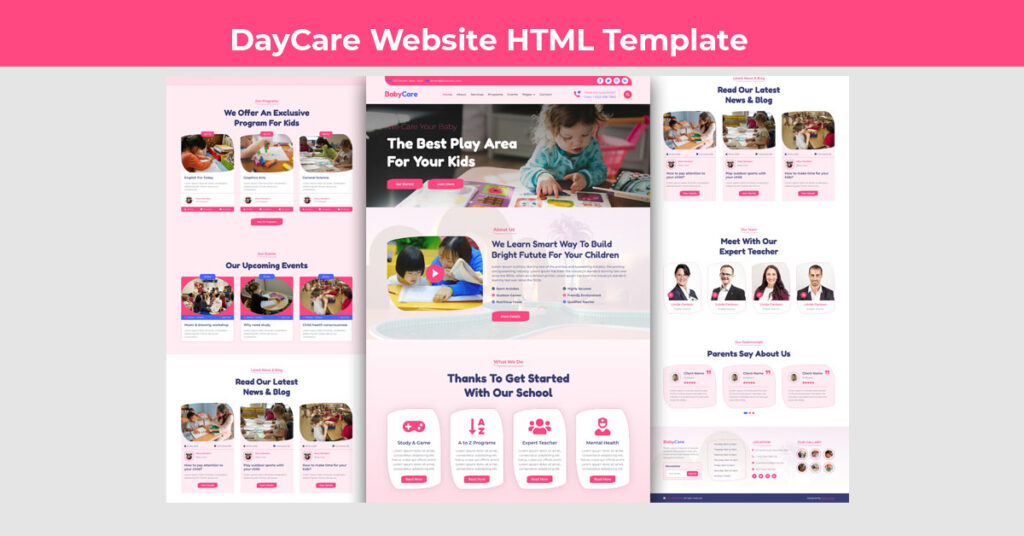
The homepage opens with a vibrant hero section featuring large typography, cheerful colors, and a clear call to action. Headlines like “We Care Your Baby” and “The Best Play Area For Your Kids” immediately communicate your brand’s purpose. The dual CTA buttons—Get Started and Learn More—encourage visitors to take the next step.
3. Modern Navbar with Contact Integration
The top navigation includes a contact bar featuring your phone number, address, and email, making it easy for parents to connect. Social media buttons and a responsive dropdown menu provide smooth browsing across all devices. A built-in search modal helps users quickly find the information they need.
4. Engaging About Section with Video Integration
The About section allows you to tell your daycare’s story in a warm and visually interactive way. It includes a video popup button that can link to a YouTube video, letting parents take a virtual tour of your daycare or watch your introduction message. Supporting bullet points like Sport Activities, Friendly Environment, and Qualified Teachers help emphasize your childcare standards.
5. Services Section – Showcasing What You Offer
BabyCare presents your daycare’s services with clarity and appeal. Four key service boxes—Study & Game, A to Z Programs, Expert Teacher, and Mental Health—each come with icons, descriptions, and “Read More” buttons. The section’s clean grid design and soft color palette make information easy to scan and engaging for visitors.
6. Programs Section – Highlighting Educational Offerings
Parents are always curious about what their children will learn. The Programs section showcases individual learning programs, each represented with an image, teacher profile, and course details like lessons, seats, and duration. The pricing badge and “View All Programs” button make it easy for parents to explore more offerings. This section is perfect for listing preschool programs, art sessions, or early learning courses.
7. Upcoming Events Section – Engaging Parents and Kids
The Events section adds vibrancy to the website by showcasing fun and educational activities. Each event card includes a circular image with an overlay lightbox, date, time, location, and a short description. Events like Music & Drawing Workshop or Child Health Consciousness not only show that your daycare is active but also attract parent engagement.
8. Blog Section – Share News, Tips, and Parenting Advice
The Blog section allows you to post updates, parenting articles, and event recaps. Each post card includes an image, author details, publication date, and a brief summary. This feature boosts SEO visibility and helps position your daycare as an authority in child care and education. Example posts like How to Pay Attention to Your Child? or Play Outdoor Sports with Your Child keep parents informed and connected.
9. Well-Structured Team and Testimonial Pages
Parents trust people, not just brands. The Team section introduces your caregivers, teachers, and support staff with their photos, names, and roles. The Testimonial section displays genuine feedback from parents, adding credibility and warmth to your daycare’s online image. These sections make your daycare feel personable and reliable.
Design and Technical Highlights
Clean and Colorful UI
The design combines cheerful tones like blue, pink, and yellow with soft white backgrounds to evoke joy and comfort. Rounded elements, soft shadows, and playful icons create a friendly atmosphere. Typography is handled by Fredoka and Montserrat fonts, ensuring readability while maintaining a fun, youthful vibe.
Fast and SEO-Friendly
BabyCare’s HTML structure is SEO-optimized, meaning search engines can easily crawl and index your pages. It includes properly structured heading tags, alt attributes for images, and meta descriptions to improve discoverability. Minified CSS and JS files ensure the site loads quickly—critical for SEO and user satisfaction.
Built with Bootstrap and Modern Libraries
This template is powered by Bootstrap 5, making customization and scalability easy. Interactive components like sliders and modals are enhanced with WOW.js, Owl Carousel, and Lightbox, providing smooth animations and transitions. These libraries make your website dynamic without compromising on speed.
Cross-Browser Compatibility
BabyCare works seamlessly across modern browsers, including Chrome, Firefox, Safari, and Edge. Whether viewed on Windows, macOS, or mobile devices, the website maintains its visual integrity and usability.
Page-by-Page Breakdown
Homepage
The homepage is the most engaging part of the BabyCare template. It includes a hero banner, quick introduction, featured services, upcoming events, and testimonials—all in a single scroll. Strategic placement of CTA buttons such as Get Started and Contact Us ensures maximum engagement.
About Page
The About page deepens trust by telling your daycare’s story, values, and educational philosophy. This section can be expanded with photos, videos, and bullet points showcasing key aspects like safety standards, teacher qualifications, and activity diversity.
Services Page
Each service is given a dedicated section with icons, titles, and detailed descriptions. Parents can quickly understand the different offerings—ranging from educational programs to extracurricular activities and health care services.
Programs Page
The Programs page is ideal for listing different age-based or subject-based courses. Each program card includes a thumbnail, teacher profile, cost, and number of lessons. This section can easily be customized to display specific courses like Toddler Learning, Creative Arts, or Language Skills.
Events Page
Upcoming events are beautifully displayed using circular image cards and lightbox popups. This interactive layout draws attention to community engagement, holiday celebrations, or learning activities hosted by your daycare.
Blog Page
The Blog page not only helps with SEO but also allows you to share valuable insights. Whether it’s parenting advice, nutrition tips, or updates about your daycare, the blog enhances credibility and drives organic traffic.
Contact Page
The Contact page features an interactive contact form, embedded Google Map, and essential contact details like email, address, and phone number. Parents can easily locate your daycare or reach out with inquiries.
Customization Made Simple
BabyCare is built to be beginner-friendly. Even with minimal coding experience, you can easily customize:
- Colors and Fonts through the
style.cssfile - Images and Videos via the
imgdirectory - Navigation links by editing HTML menus
- Section layouts using Bootstrap’s grid system
Developers can extend functionality with backend integration using PHP, Node.js, or any CMS platform. You can also link forms to email services or CRMs to manage inquiries efficiently.
Performance and Optimization
Performance plays a vital role in user satisfaction and SEO. BabyCare is designed with optimization best practices:
- Compressed images for faster load times
- Minified CSS and JS files
- Lazy loading for multimedia content
- Mobile-friendly touch interactions
These enhancements result in smooth browsing experiences, reduced bounce rates, and improved conversions.
SEO Advantages of Using BabyCare
- Mobile-First Design: Fully responsive for mobile users, ensuring top ranking in mobile searches.
- Clean Semantic Code: Properly structured HTML improves visibility for search engines.
- Keyword Optimization: Sections like Services, Programs, and Blogs are ideal for inserting relevant local and educational keywords.
- Meta Tag Support: Easily editable meta titles and descriptions improve click-through rates.
- Fast Loading Speed: Helps achieve higher Google PageSpeed Insights scores and better SEO rankings.
Why Choose BabyCare for Your Daycare Website
The BabyCare template isn’t just about aesthetics—it’s designed to convert visitors into loyal clients. Its structure, design, and functionality align with what parents expect from a trustworthy childcare provider. Here’s why it’s the perfect fit:
- Trustworthy and cheerful design that appeals to parents and kids alike
- Comprehensive layout covering all daycare needs—programs, teachers, events, and contact forms
- High flexibility for both beginners and developers
- SEO and speed optimization to attract more local visitors
- Interactive and engaging user experience for long-term retention
Integration Possibilities
Since it’s built on pure HTML, CSS, and JS, the template can easily integrate with:
- CMS platforms like WordPress or Joomla
- Backend systems like Laravel, Django, or PHP mail handlers
- APIs for live chat, booking systems, or newsletter subscriptions
This scalability makes it suitable for small daycare startups as well as established preschool institutions.
Final Thoughts – Build a Loving Online Presence with BabyCare
The BabyCare Day Care Website HTML Template is a delightful blend of functionality, aesthetics, and user-friendliness. Designed specifically for childcare, preschool, and kindergarten websites, it offers a heartwarming digital experience that resonates with parents. With its responsive design, smooth animations, and SEO-ready code, BabyCare enables you to establish a professional, trustworthy, and joyful online presence. Whether you’re a new daycare opening your doors or an established preschool expanding your online visibility, this template provides the perfect foundation to showcase your love, care, and educational values. The BabyCare template turns your daycare’s story into a digital experience that parents will love and trust.
Download Day Care Website HTML Template Source Code